
 English
 EN
EN FRENCH
 繁体中文
繁体中文





Best Ad Spy Tools for Ecommerce in 2026
Compare five ad spy tools for ecommerce, then learn how to turn competitor ads into creative tests and check the landing page customers see in each market.

You find a competitor’s video ad for a product like yours. It opens with a customer complaint, shows the product in use, and ends with a discount. The advertiser has several versions of the same idea.
That gives you a lead for your next creative test. It does not tell you whether the campaign makes money.
Ad spy tools help ecommerce teams find those leads across advertisers and markets. Some give you access to a platform’s own ad library. Others add search filters, saved research, or competitor tracking. The five tools below serve different parts of that work, from finding a product angle to checking whether a brand has changed its message.
Compare the Tools at a Glance
|
Tool |
Use it when you need to… |
|
PrimeSpy |
Research ecommerce competitors, compare creatives, and track changes |
|
Meta Ad Library |
Check ads from a known Meta advertiser |
|
TikTok Creative Center |
Study TikTok video hooks and formats |
|
BigSpy |
Explore ad ideas across platforms |
|
Minea |
Research products alongside ecommerce ads |
Start with the decision you need to make. A merchant planning Meta creatives needs a different view from a dropshipper screening product ideas.
1. PrimeSpy: For Ongoing Competitor Research
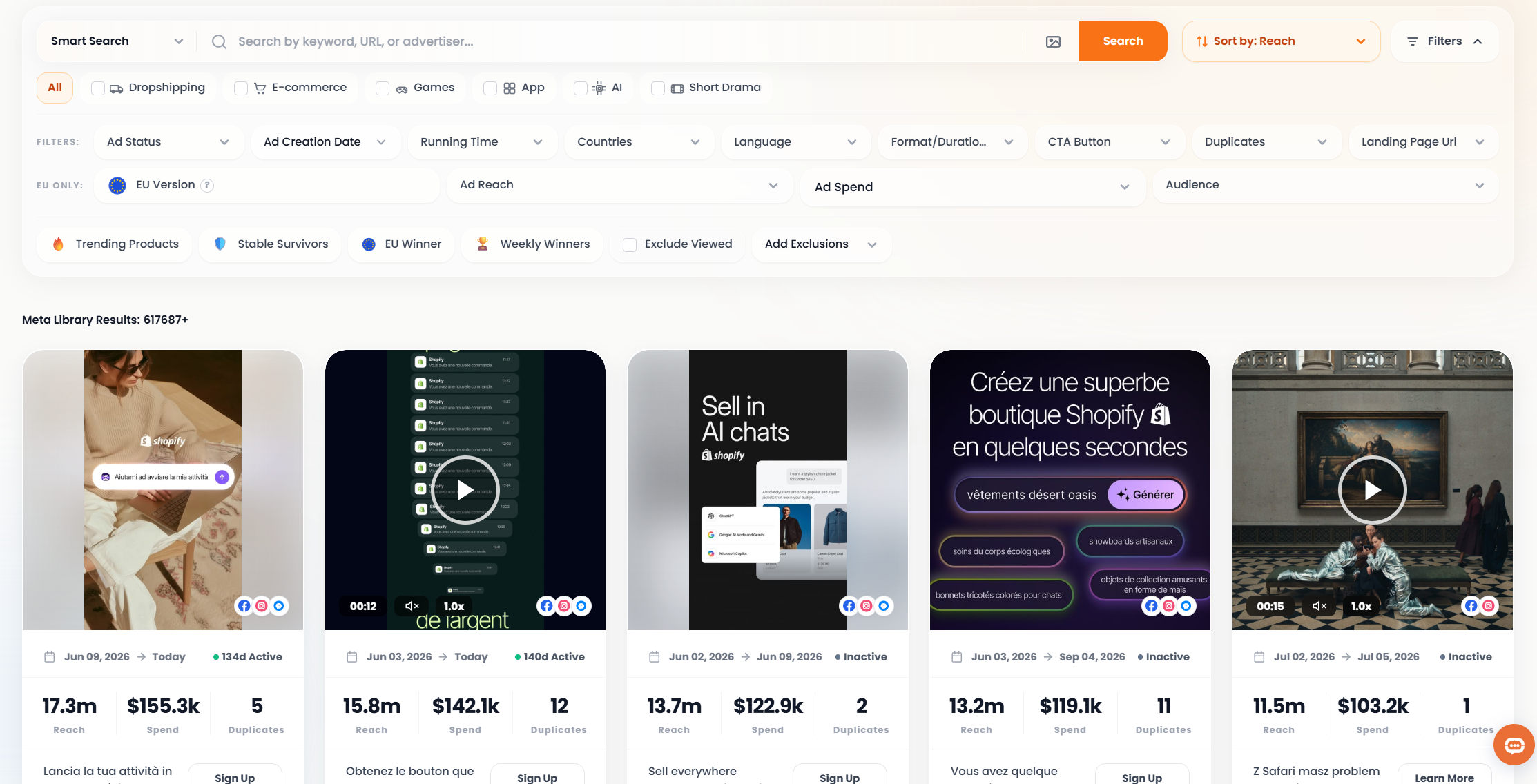
A native ad library works well when you know the brand you want to inspect. Ecommerce teams also need to search across brands, compare creative angles, and return to the same competitors after they launch new ads. PrimeSpy focuses on that wider workflow.
You can search ads and advertisers, narrow results with filters, save examples, and track competitors. PrimeSpy’s site lists filters for details including ad format, call to action, landing page, dates, and campaign signals. Its coverage centers on Meta and TikTok ad research.
Say you sell desk chairs in the US. Search competing brands and terms such as “ergonomic chair,” then group the ads you find by message. One brand may lead with back support; another may show how the chair fits a home office. Open several ads from each brand before drawing a conclusion. A single video could be an experiment the advertiser plans to drop.
Save the examples that raise a testable question. If three competitors show assembly in their first few seconds, your team could test an assembly demonstration against its current product-focused opening. PrimeSpy’s tracking features give you a way to revisit those advertisers and see whether they keep using the angle.
Visible ad activity deserves care. An advertiser may run many versions because it has a large budget, a weak first draft, or a testing habit. You cannot calculate its return on ad spend from an ad spy tool.
2. Meta Ad Library: For Checking a Known Brand
Meta Ad Library gives you a direct view of ads from a Meta advertiser. Search a brand, choose the country you care about, and inspect the creative, copy, call to action, and linked page.
Use it before a competitor review meeting. If someone shares a screenshot from last month, check the advertiser in Meta Ad Library to see what you can find now. Look across its ads for repeated offers and product claims. Open the destination pages as well; the offer in the ad may make more sense once you see the page.
Meta Ad Library suits a focused brand check. Teams that research dozens of advertisers each week may want a separate place to filter, save, and track their findings.
3. TikTok Creative Center: For Video Ideas
TikTok’s Creative Center Top Ads shows examples of ads on the platform. Watch them as an editor would: pay attention to the opening shot, the first line of text, and the moment the product appears.
Suppose you sell a kitchen storage product. One advertiser may start with a crowded drawer. Another may show the finished drawer first, then demonstrate how the product fits. Those approaches give you two distinct openings to test with your own footage.
Take notes on the technique, not the script. Your product may solve a different problem, and your customers may respond to different proof. Creative Center helps you study TikTok’s format; use advertiser research to understand a competitor’s broader offer.
4. BigSpy: For Exploring a Category
BigSpy covers ads across multiple platforms and offers competitor research features. Its broad library suits the start of a project, when you need to learn how brands present a category.
Give the search a narrow brief. “Skincare ads” will produce a pile of examples. “How do brands demonstrate a cleanser for sensitive skin?” gives you something to compare. Record the claims brands make, the proof they show, and the pages they send shoppers to.
After you identify relevant advertisers, follow those brands in more detail. Broad discovery can point you toward competitors; it cannot tell you which message will work for your store.
5. Minea: For Product Research
Minea focuses on ecommerce products and the ads that promote them. Merchants exploring a new category can use it to find product candidates and study how other sellers pitch them.
Look past the product photo. Compare the price, the problem each ad names, and the demonstration it uses. Two sellers may promote the same item to different customers. That difference can suggest a positioning test.
Before you source a product, check supplier reliability, shipping costs, returns, and your margin. Ad activity gives you a reason to investigate. It does not settle the buying decision.
Turn Competitor Ads Into a Test Brief
A useful research session ends with a decision your team can act on. Try this workflow for one product category:
- Write the question. For example: “How do US chair brands address comfort concerns in video ads?”
- Collect a small set. Use PrimeSpy to find relevant advertisers and save several ads from each. Check individual brands in Meta Ad Library or study video structure in TikTok Creative Center.
- Record what you can see. Note the opening, claim, demonstration, offer, call to action, and landing page. Keep observations separate from guesses about performance.
- Choose one test. Write a brief for a new opening, product demonstration, or offer presentation. Use a claim your business can support.
- Review the result in your own account. Your customers’ response gives you evidence that competitor ads cannot provide.
A shared research note can stay short. Include links to the source ads, two or three observations, and the creative your team plans to make. Add a date so the team knows when it saw each example.
Check the Page Shoppers See After the Click
An ad may target one country while you browse from another. Open its landing page from your usual location and you could see a different currency, offer, shipping message, or product range from the one its intended customers see.
For regional research, use a service such as Swiftproxy to check the public landing page from the market you’re studying. Compare that page with the ad. Does the product appear in stock? Does the promotion carry through? Can a shopper find shipping and return terms for their country?
This check gives your creative team context for the ad. A “free shipping” hook, for example, means little until you see the conditions on the destination page. Record the country and date with your notes, since merchants can change their pages and offers.
Pick the Tool That Fits Your Next Task
Use Meta Ad Library for a known Meta advertiser and TikTok Creative Center when you need video ideas. BigSpy can help you survey a category; Minea can help you investigate product candidates.
If your team returns to competitor research each week, start with PrimeSpy. Search across ads, save the examples that matter, and track the advertisers behind them. Then check the landing page in the relevant market with Swiftproxy before you turn an ad into a creative brief.
You do not need a competitor’s exact script. You need a claim you can make, a demonstration you can produce, and a test that shows how your customers respond.
About the author
 Top-tier residential proxy solutions
 {{item.title}}
Related articles

 14
14


- Please provide your account number, or email address.
- Provide videos or screenshots, and simply describe the problems you are facing.
- Our staff will reply to your message within 24 hours.



